Chapter 23: Selling with confidence
What you'll learn: how to keep purchase records that support your business, how to choose brands sensibly, how to keep your account healthy, and what to do, calmly, if Amazon ever asks for documents.
Buying products from stores and websites and reselling them on Amazon is a long-established, Amazon-permitted way to sell. Every product you sell must be genuine and in the condition you list it in, and a few good habits make that easy to show. This chapter covers the ones that matter.
1. Proof of purchase: your records
Every store receipt or online order email shows where a product came from, what you paid and when. Together they're also the records your CPA or bookkeeper needs (Chapter 2.2).
Make them as useful as you can:
- Buy in your business name, and use your business address for online orders. Make them match the name and address in Seller Central.
- Pay by card or bank transfer, so your statements back up each purchase. Keep the statements too.
- Save everything digitally. Photograph store receipts the same day, and save online order confirmations as PDFs. A folder per month, with files named by date and retailer, keeps things tidy.
- Note the sales tax. Your receipt shows any sales tax you paid. If you bought tax-exempt with a resale certificate or through Amazon Business tax exemption, keep a copy of the certificate or exemption record with your files (Chapter 6).
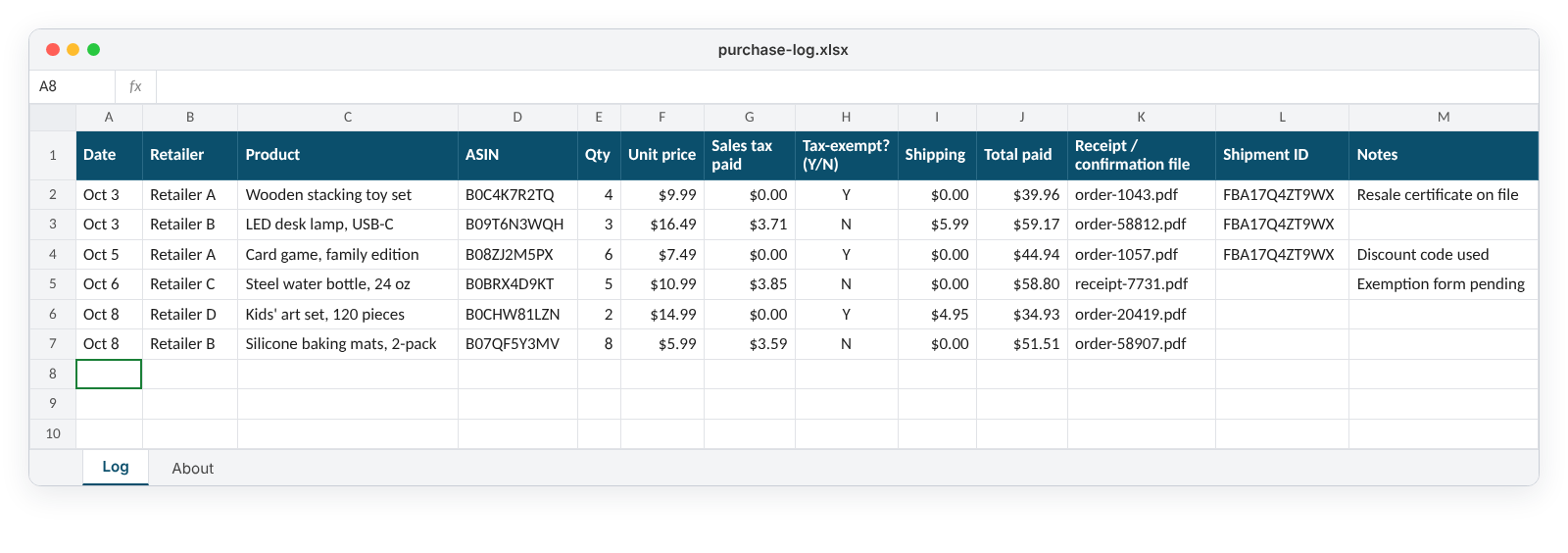
- Keep a purchase log: date, retailer, product, ASIN, quantity, price paid, sales tax and where the file is saved. It takes a minute per order and makes any later question quick to answer. The purchase log template on the Downloads page has these columns ready.
- Ask for an invoice where one is offered. Some retailers can provide an invoice or a business-account receipt. It's a useful extra record.
"Keeping good purchase records": saving receipts and order confirmations and keeping a simple purchase log, recorded with US retailers.
2. Choose brands sensibly
Most brands are resold on Amazon by many sellers, and the seller count shows it. A few brands control closely who sells their products. Choosing well keeps things simple:
- Favor brands with several FBA sellers. Many sellers on a listing is a good sign the brand is widely resold.
- Use ArbiSource's potential IP issue warnings. Results can show a warning for potential intellectual property (IP) issues, and a filter can exclude them. Leaving these out is a sensible default while you learn.
- Be cautious with brands that sell mainly through their own store, or listings with only one or two sellers.
- Check for Transparency. Some brands protect their products with Transparency codes, a unique code on every unit. If a product uses Transparency, every unit you send needs a valid code. Never cover or remove it with your own labels. If you can't be sure the units you'd buy carry valid codes, choose another product.
- Sell items in the condition you list. "New" means brand new, unused and unopened, in the original packaging with everything included (Condition guidelines).
3. Keep your account healthy
The Account Health page in Seller Central shows how your account is doing. Its Account Health Rating runs from 0 to 1,000 and is color-coded:
| Rating | Score | What it means |
|---|---|---|
| 🟢 Healthy | 200 to 1,000 | Not at risk of deactivation under the policies the rating covers |
| 🟡 At Risk | 100 to 199 | At risk of deactivation; deal with any issues promptly |
| 🔴 Unhealthy | 99 or lower | Eligible for deactivation |
Every new seller starts at 200. Points are lost for policy issues and won back when you address them. A few simple habits keep you comfortably Healthy:
- Look at Account Health once a week, as part of your weekly checks.
- Read every performance notification and deal with it in good time, most serious first.
- Keep your emergency contact phone number current (under Notification preferences), so Amazon can reach you if needed.
Source: Account Health Rating program policy.
4. If Amazon asks for documents
Now and then Amazon may ask a seller to show where a product came from, for example after a customer or brand complaint. It's a routine check, and a calm, organized reply is what's needed.
- Read the notification carefully. Note which ASINs it covers, what's being asked for and any deadline.
- Gather your records for those ASINs: receipts, order confirmations and invoices. This is where your purchase log pays off.
- Check them against Amazon's requirements. Amazon's invoice requirements ask for documents that:
- show an issue date within the 365 days before the notification;
- cover the quantity you've sold and have in stock for each ASIN;
- identify the products clearly, for example by name or model number;
- include the supplier's contact details: name, phone number, address and website;
- are PDFs or images (.pdf, .jpg, .png or .gif, up to 10 MB), not editable files such as spreadsheets.
- Send them exactly as they are. You can hide prices and highlight the relevant products, but every document must be authentic and unaltered.
- Reply through the link in the notification, with a short, polite note listing what you've attached.
If you can't provide what's asked for, you can choose to stop selling that product. One product doesn't define your business, and it's a useful lesson for your brand choices.
A document request isn't an everyday event, and it isn't a verdict on you. Good records, sensible brands and genuine products in the right condition are all it takes to sell with confidence.
Checklist
- I buy in my business name and pay by card or bank transfer
- I save every receipt and order confirmation, and keep a purchase log with a sales tax column
- I favor brands with several FBA sellers and exclude potential IP issues while I'm learning
- I never cover a Transparency code
- I check Account Health weekly
- I know how to respond calmly to a document request