Chapter 7: Profit, ROI and cash flow
What you'll learn: how to work out the real profit on a product, what ROI tells you, how to set sensible minimums, and how long your money is tied up between buying and getting paid.
The profit formula
For each unit:
Profit = sale price − Amazon's fees − your other costs − what you paid for the product
- Amazon's fees: referral, fulfillment, surcharge, storage and inbound placement (Chapter 5).
- Your other costs: prep supplies and shipping your stock to Amazon.
- What you paid: the retailer's price after any discount codes, plus any shipping charge, plus any sales tax you paid (Chapter 6).
ROI and margin
Two percentages tell you how good a deal is:
- ROI (return on investment) = profit ÷ what you paid for the product. It tells you how hard your money is working. A $3 profit on a $6 item (50% ROI) uses your cash far better than a $3 profit on a $30 item (10% ROI).
- Margin = profit ÷ sale price. It tells you how much room you have if the price falls.
ArbiSource shows profit and ROI on every result. Most arbitrage sellers think mainly in profit per unit and ROI.
Worked example: the boxed toy
Selling at $24.99 and listed at $12.00. We've added example prep and shipping costs; yours will depend on your supplies, carrier and location. The right-hand column assumes 7% sales tax at checkout.
| Bought tax-exempt | Paying 7% sales tax | |
|---|---|---|
| Sale price | $24.99 | $24.99 |
| Referral fee (15%) | −$3.75 | −$3.75 |
| FBA fulfillment fee plus surcharge | −$4.76 | −$4.76 |
| Storage, one month | −$0.05 | −$0.05 |
| Inbound placement fee, example figure | −$0.30 | −$0.30 |
| Prep (label and poly bag), example figure | −$0.20 | −$0.20 |
| Shipping to Amazon, example figure | −$0.40 | −$0.40 |
| Product cost | −$12.00 | −$12.84 |
| Profit | $3.53 | $2.69 |
| ROI | 29% ($3.53 ÷ $12.00) | 21% ($2.69 ÷ $12.84) |
Break-even price. Work backward to find the lowest price at which you'd make no loss. Bought tax-exempt, this toy breaks even at about $20.84, so there's roughly $4.15 of room if other sellers cut their prices. In ArbiSource, type lower sale prices into a result's Sell box until the profit reaches zero.
Use the average price, not today's price
A product's Amazon price can spike for a few days when stock runs low, then drop back. Buy at the spike and your profit can disappear.
So always check the profit at the product's average selling price over the last few months, not just today's price. In ArbiSource, each result's past-performance table shows the average Sell Price over the last 30, 90, 180 and 365 days, worked out from the price at each sale (BSR drop), with the Profit / ROI at each. To try a price yourself, type it into the result's Sell box.
If a product is only profitable at today's price, it's a watch, not a buy. That's the Money question in the Lead Check (Part 5).
Setting your minimum profit and ROI
There's no single right number, and you'll hear very different figures online. Rather than borrowing someone else's, base your minimums on:
- Your costs per unit: your minimum profit should comfortably cover prep, shipping, the placement fee and your time.
- Your risk: a lower ROI can be fine on a fast, stable seller; a slow or jumpy product needs more cushion.
- Your cash: on a small budget, a higher ROI helps it grow faster.
- Sales tax: if you usually pay it, either allow for it per lead or add a few points to your minimum ROI (Chapter 6).
Start with modest minimums in your ArbiSource filters, so you see a wide range of products while you learn (4.3). Raise them as you learn what a good deal looks like for you.
Cashback and stacking
Cashback portals, discounted gift cards and credit-card cash back can all lower what you really pay, and ArbiSource has a cashback button on results where it's available. Stacking several of these is common in the US. Offers change constantly, and cashback can be delayed, declined or capped, so check the terms for each retailer. Chapter 25 covers stacking in more detail.
Cash flow: how long your money is tied up
Profit is only half the story. The other half is how long your money is out of your hands. A typical online arbitrage cycle looks like this:
| Stage | What happens | Roughly how long |
|---|---|---|
| 1. Buy | You pay the retailer | Day 0 |
| 2. Delivery to you | The order arrives (or reaches your prep center) | A few days |
| 3. Prep and ship | You label and pack it, and send it to Amazon | Depends on your routine; many sellers ship weekly |
| 4. Receiving | Amazon receives your boxes and makes the stock available | Often several days, longer in busy periods or if stock is sent between centers |
| 5. Sale | A customer buys | Depends on how fast it sells |
| 6. Funds released | Each sale's money is held until 7 days after delivery to the customer (DD+7) | About a week or more after the sale |
| 7. Payout | Amazon pays out on its settlement cycle | Up to 14 days |
| 8. In your bank | Transfer from Amazon | A few business days |
Source: Amazon's payout and reserve policy.
Put together, a month or more between buying and getting paid is common, and slow sellers take longer. That's why:
- Fast, steady sellers grow your budget quickly. The same $100 can go round several times in a few months.
- It pays to keep some cash back for good deals that appear while your money is tied up.
- Reinvest gradually as payouts start arriving.
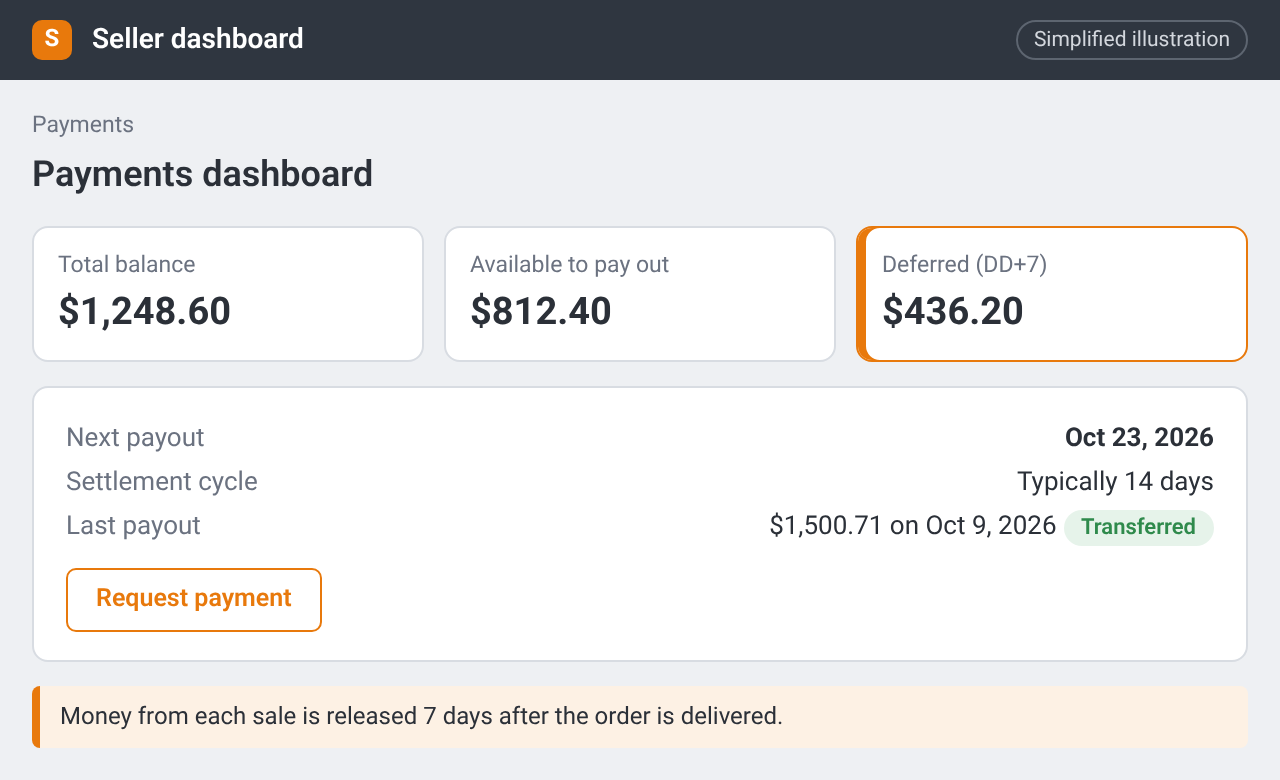
Payments dashboard: total balance, the amount available, the amount deferred for 7 days after delivery (DD+7), the next payout date and the Request payment button. Simplified illustration – the real screen may look different.
Track what really happened
ArbiSource's profit figure is an estimate made before you buy. Your real profit depends on the price you actually sell at and the costs you actually paid. A simple purchase log (date, retailer, ASIN, quantity, cost, sales tax, target price) lets you compare the two and learn from every buy. You'll find a ready-made purchase log on the Downloads page in the Resources section.
Checklist
- I can work out profit and ROI for a product, including any sales tax I pay
- I check the profit at the average selling price, not just today's price
- I've chosen starting minimums for profit and ROI, set low enough to learn
- I understand my money will be tied up for a month or more on each purchase