Chapter 24.3: After approval: what to expect
How and when Amazon pays you
Amazon pays out on a settlement cycle, usually every 14 days, and holds each sale's money until 7 days after delivery ("DD+7"). Chapter 38 has the details.
"Restricted" products
Some categories and brands need Amazon's approval first (gated). Restrictions affect every seller, vary by account, and many open up as your sales history grows (Chapter 31).
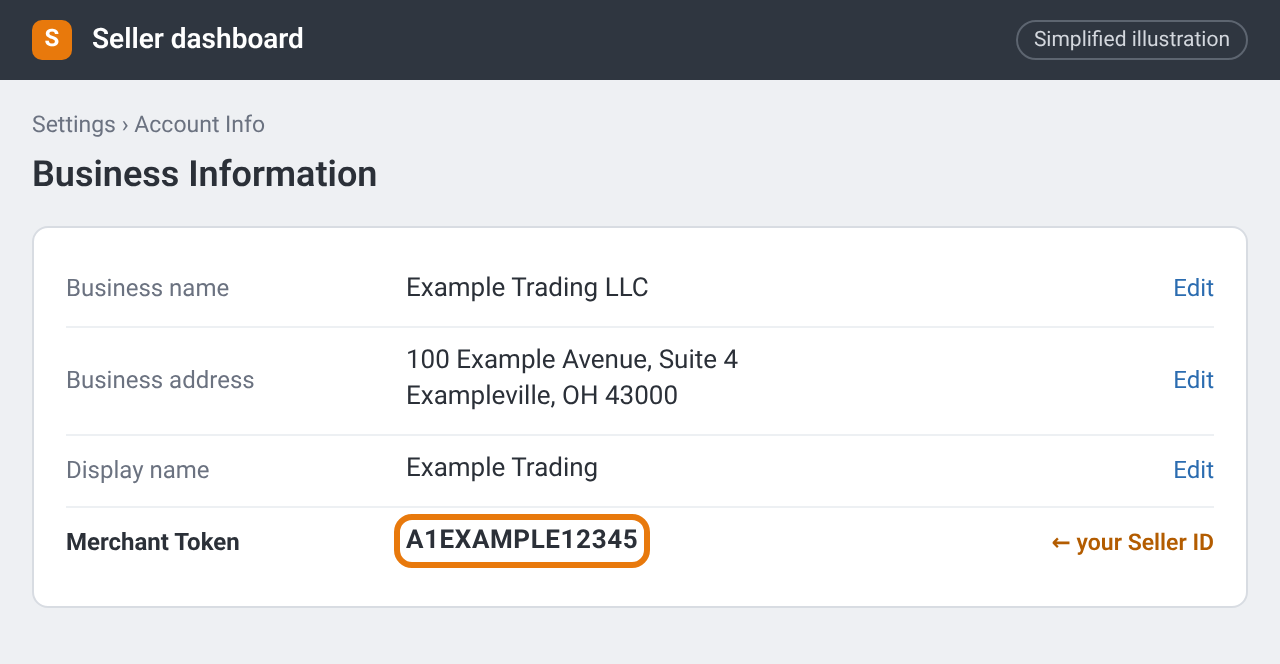
Finding your Seller ID
Your Seller ID (Merchant Token) identifies your seller account. ArbiSource support needs it to reconnect or move your Amazon link, and you'll use it to reverse-search your own storefront. Find it in Seller Central under Settings → Account Info → Business Information, and copy it carefully: one missing character means it won't match your account.
A new account and ArbiSource
- Give a brand-new account up to 5 days. Amazon can take up to 5 days to switch on the connection that lets third-party software, including ArbiSource, work with a new seller account. Until then, anything in ArbiSource that uses your Amazon connection (restriction checks, live Amazon data and so on) may not work yet. This is normal and sorts itself out: if things don't work straight away, wait up to 5 days and try again.
- Check Seller Central for outstanding tasks. If it's been longer than 5 days, or Seller Central still needs something from you (a payment method or a verification step, for example), complete those first, then re-authorize from your ArbiSource Account page. There's nothing to reset in ArbiSource.
- If things look empty after you first connect, log out and back in.