Chapter 3.3: After approval: what to expect
What you'll learn: how payouts work, why you'll see "restricted" products, where to find your Seller ID, and how to get your new account ready for ArbiSource.
How and when Amazon pays you
- Amazon pays out on a settlement cycle, usually every 14 days. Your first settlement is around 14 days after you register.
- Each sale's money is held until 7 days after the item is delivered to the customer. Amazon calls this a "DD+7" reserve, and it may be extended in some situations.
- After each settlement, allow a few working days for the money to land in your bank.
The details are in Amazon's payout and reserve policy and on Amazon UK's Learn page.
"Restricted" products
No seller account can sell everything. Some categories and brands need Amazon's approval first. This is called being gated. You'll see messages like "You need approval to list in this brand", or ArbiSource will mark some products as restricted.
Restrictions affect every seller, new and established. A few things worth knowing early:
- Restrictions are set account by account. Two sellers can get different answers for the same product.
- Many brands open up over time as your account builds a sales history. Keep checking.
- ArbiSource's restriction checks help you focus on the products you can sell from day one.
- ArbiSource's Restriction Tracker (Pro and Premium) monitors the brands you're gated in and automatically tries to get you approved, re-checking regularly.
Chapter 22 (Gating, ungating and the Restriction Tracker) covers all of this in detail.
Finding your Seller ID
Your Seller ID (sometimes called a Merchant Token) identifies your seller account. You'll need it if you ever ask ArbiSource support to reconnect or move your Amazon link.
In Seller Central, go to Settings → Account Info → Business Information and look for your Seller ID (Merchant Token).
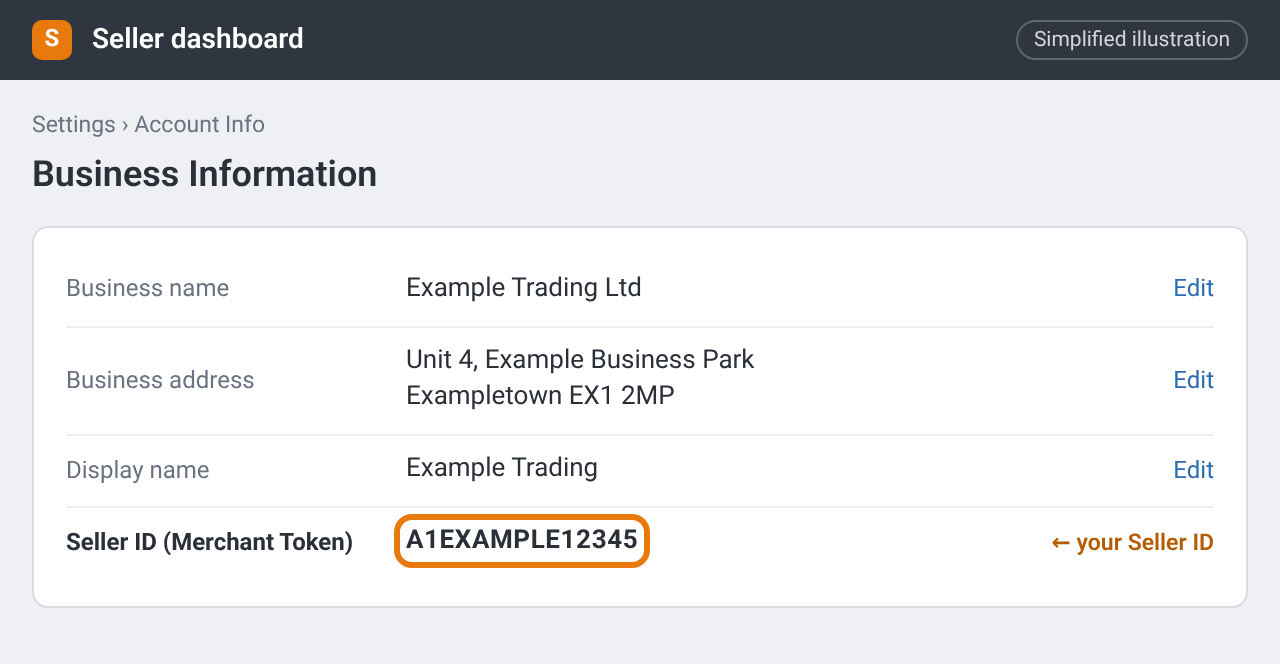
Business Information with your Seller ID (Merchant Token) highlighted. Simplified illustration – the real screen may look different.
Copy it carefully. A single missing character means support can't find your account.
A new account and ArbiSource
When you connect a brand-new seller account to ArbiSource, a couple of things can take a little while:
- Give a brand-new account up to 5 days. Amazon can take up to 5 days to switch on the connection that lets third-party software, including ArbiSource, work with a new seller account. Until then, anything in ArbiSource that uses your Amazon connection (restriction checks, live Amazon data and so on) may not work yet. This is normal and sorts itself out: if things don't work straight away, wait up to 5 days and try again.
- Check Seller Central for outstanding tasks. If it's been longer than 5 days, or Seller Central still needs something from you (a payment method or a verification step, for example), complete those first, then re-authorise from your ArbiSource Account page. There's nothing to reset in ArbiSource.
- Data can take a short time to sync after you first connect. If things look empty, log out and back in, and give it a little time.
Checklist
- Account approved and on the Professional plan
- I understand the payout cycle and that "restricted" messages are normal for every seller
- I've found my Seller ID and saved it somewhere safe
- Any outstanding Seller Central tasks are done